UA HubIntranet Redesign
Redesigning information architecture and governance for ~300 University Advancement staff across a 10-week internship.
View Case Study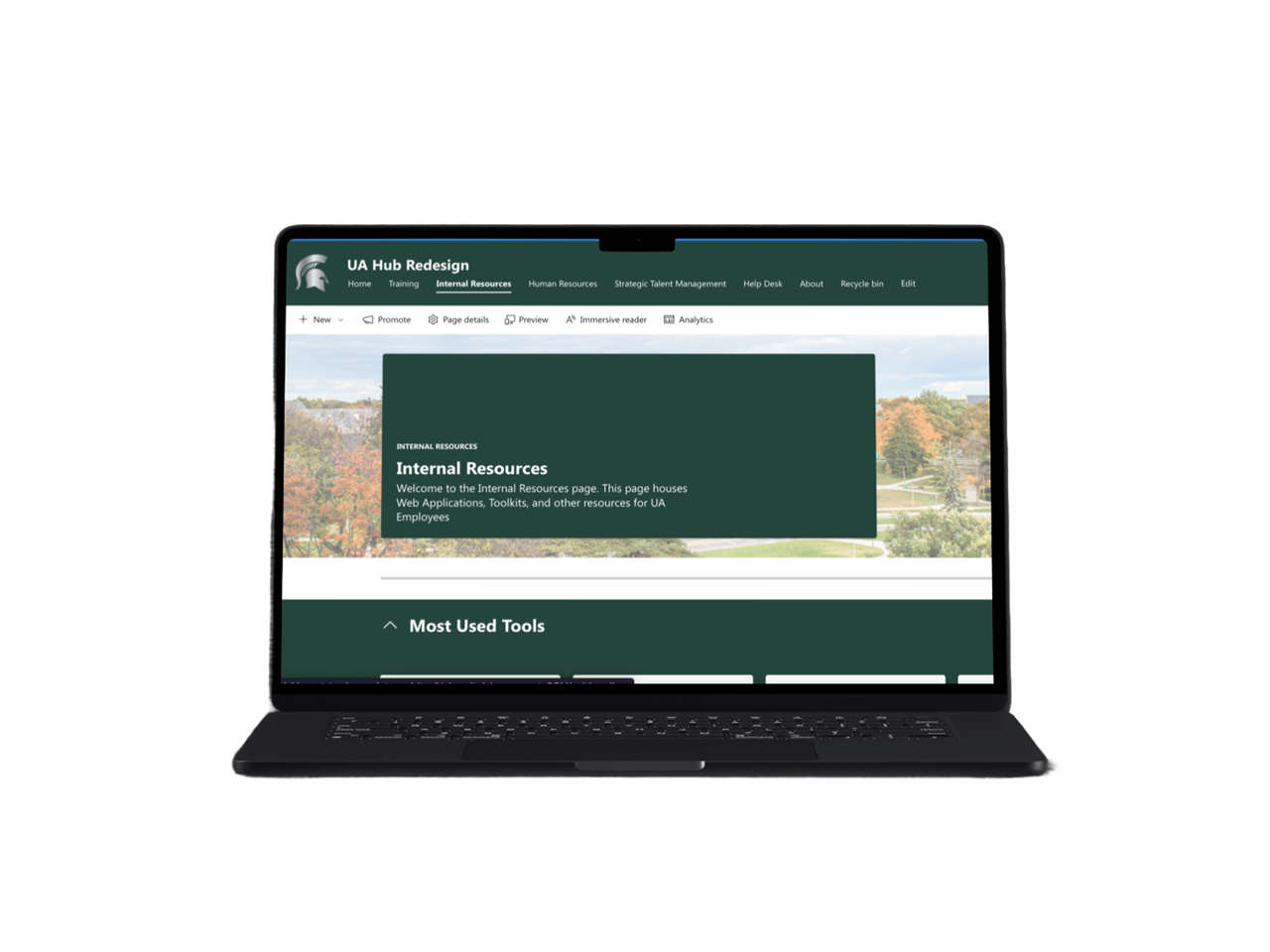
The 30-Second Version
The UA Hub is an internal SharePoint platform at Michigan State University's University Advancement division. Staff use it to access tools, training, HR resources, and internal communications. It gets consistent traffic — 26,446 visits in 30 days. Staff were still going to email, direct links, and Microsoft Teams to get things done. This project diagnosed the structural failures behind that behavior and proposed a scalable redesign built on IA restructuring, UX flow validation, and a governance model designed to hold up after the internship ended.
A Trust Problem, Not a Traffic Problem
Staff visited regularly. Experienced users could find what they needed — because they had memorized where things were. New employees had no chance. Content was duplicated across departments. Pages went months without updates. Nobody knew who was responsible for what. The search bar froze during peak use.
Three systemic failures drove the redesign.
The project operated under real enterprise constraints. SharePoint limits layout, search, and personalization options significantly. Stakeholder expectations varied across HR, IT, and Communications. The internship ran 10 weeks with no guaranteed ownership handoff at the end. Every design decision was made with those realities in mind.
What's at Stake
A fragmented intranet carries measurable operational cost.
Consistent traffic from only 331 unique users — users returning repeatedly, not finding what they need the first time.
On an internal tool built for quick task completion, that number points to struggle, not satisfaction.
Near-universal desktop use means SharePoint's mobile limitations were a lower-priority constraint.
HR and IT stakeholders confirmed staff regularly contacted colleagues directly for resources that should be self-serve. Those requests consume time on both ends. At scale, across 300 staff, that adds up quickly.
HR stakeholder Tabatha Dixon said it plainly: a fairly new employee was having a hard time — they discovered things by accident. Every new hire who can't navigate independently adds to HR support load.
Making the Friction Visible
Research ran across the full 10-week timeline using qualitative and quantitative methods in parallel. Staff knew the platform was underperforming. Most couldn't say exactly why — they had built workarounds so gradually that the friction had become invisible. Interviews made it visible.
Seven stakeholder interviews across HR, IT, Marketing & Communications, and Events. Site analytics from May 15 to June 11, 2025. UX audits across high-traffic sections. Qualitative usability check-ins at the individual level.
Nobody had a shared answer. That was the root cause. Each interview surfaced different complaints on the surface — search failures, confusing labels, outdated content, a staff directory that sorts by first name. The structural failure underneath all of them was consistent: the Hub had been organized around content ownership, not around how staff actually needed to use it.
Three Interventions
SharePoint imposes hard constraints on layout, search, and personalization. Every solution in this project was pressure-tested against what the platform could actually support, not just what ideal UX would call for.
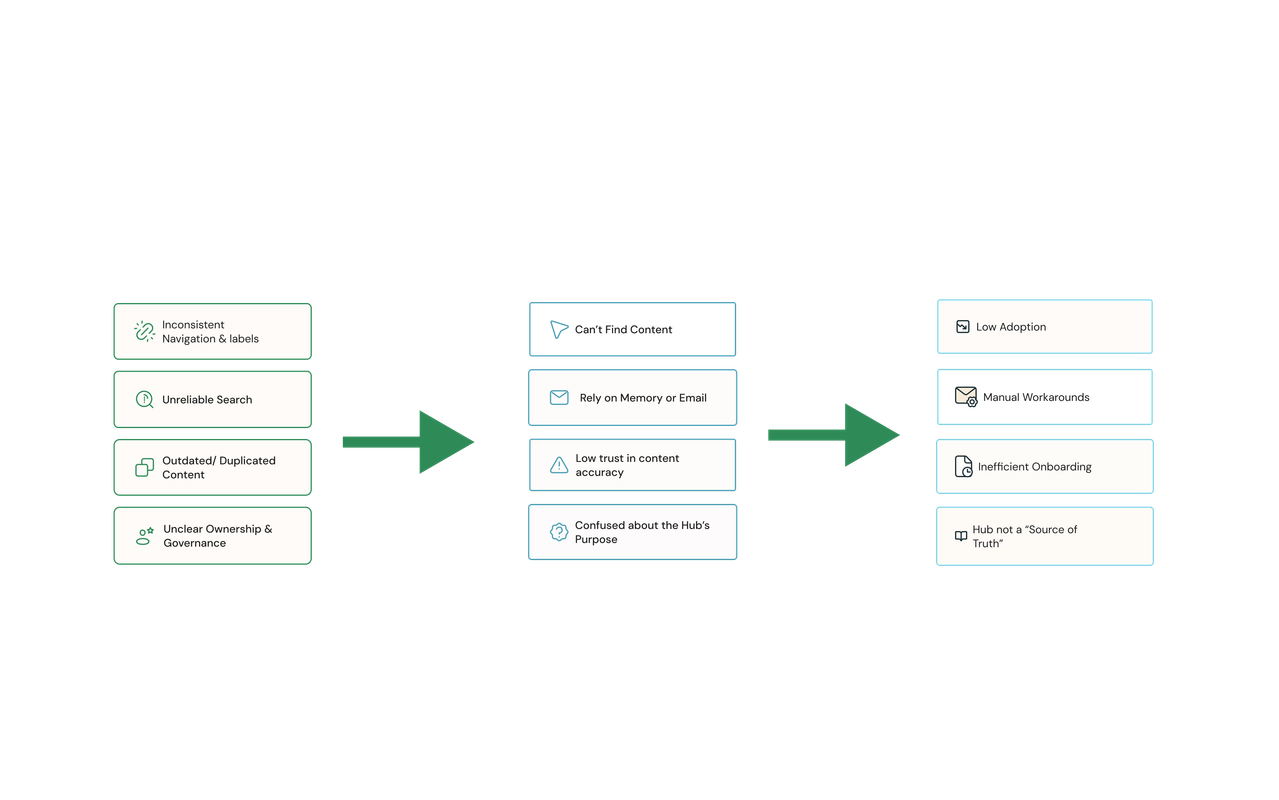 Structural failures created a cascade that made the Hub functionally unusable as a self-service tool.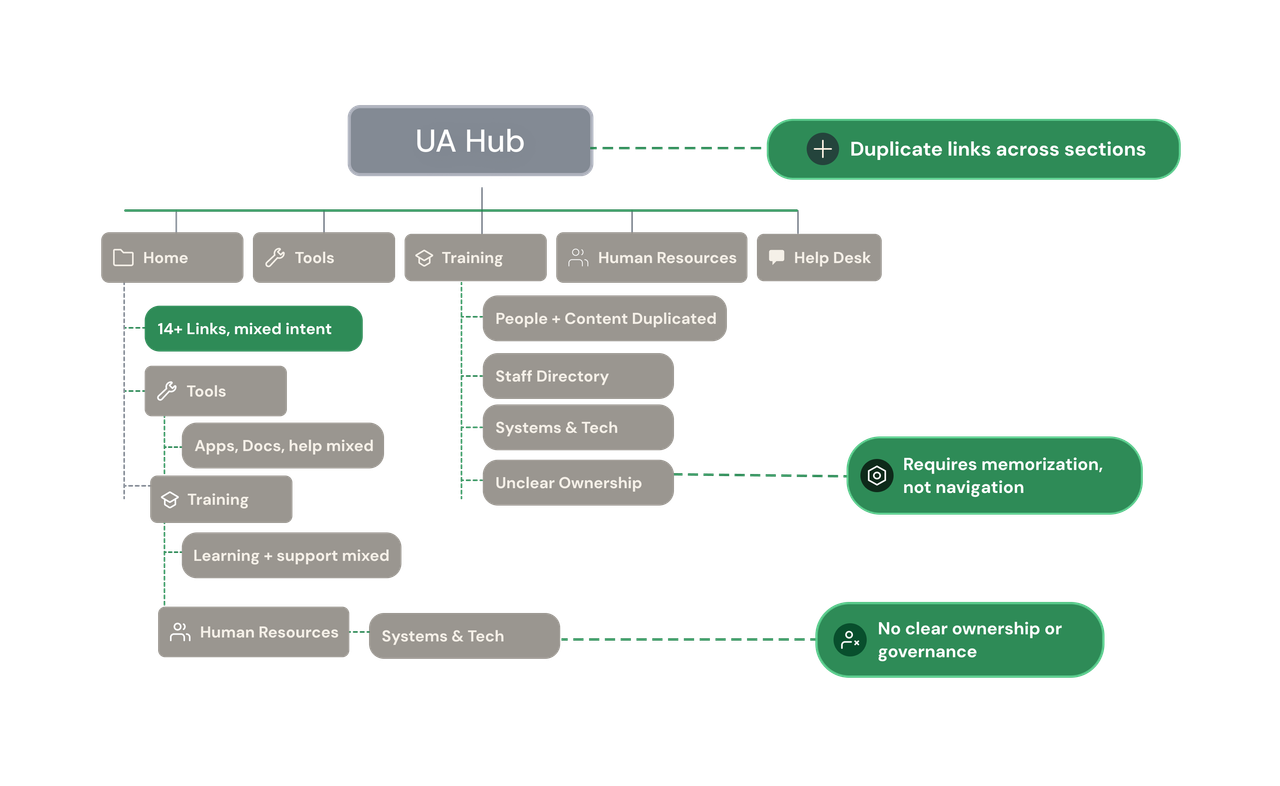
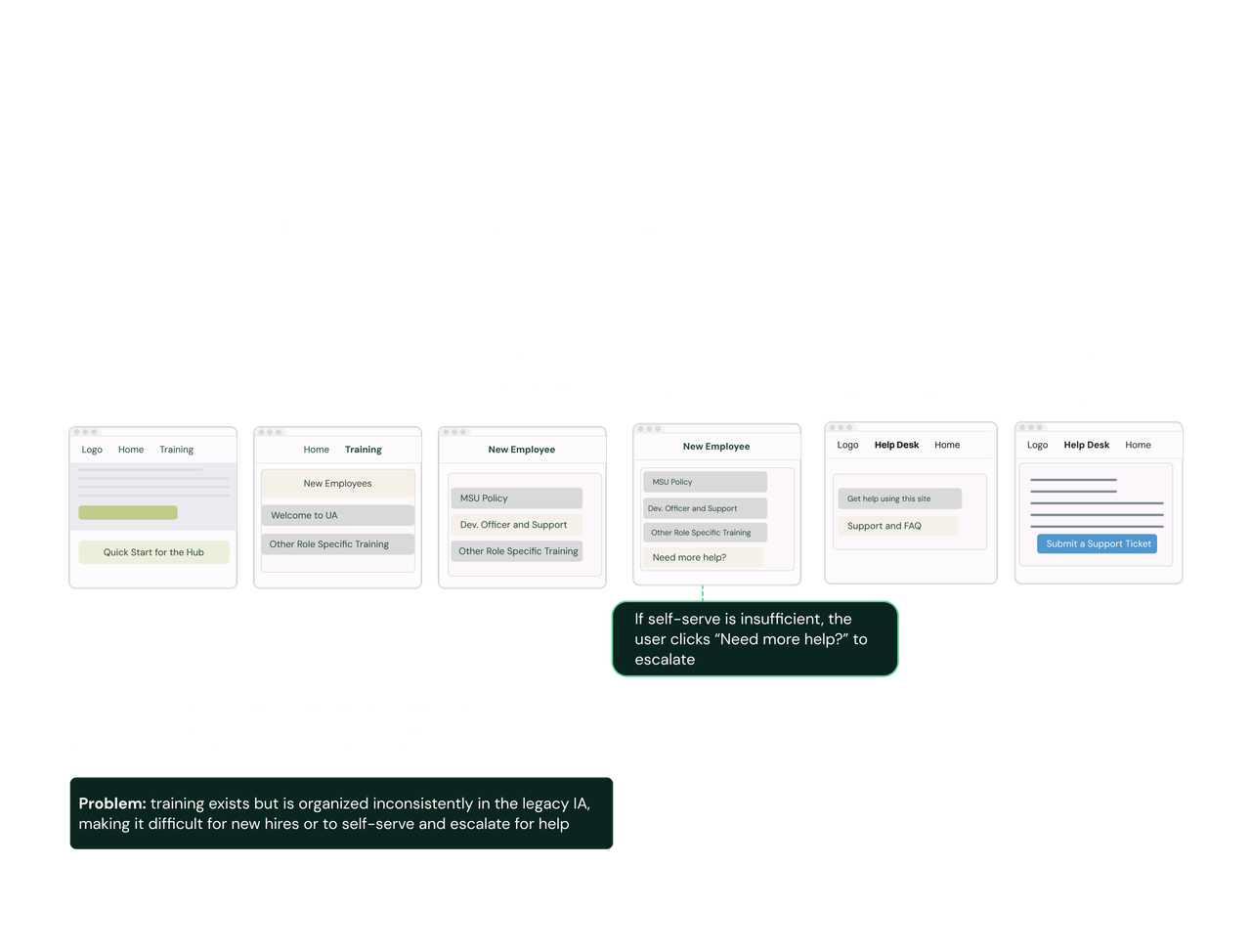
A new employee's path from the UA Hub homepage to a support escalation — six steps, zero dead ends.
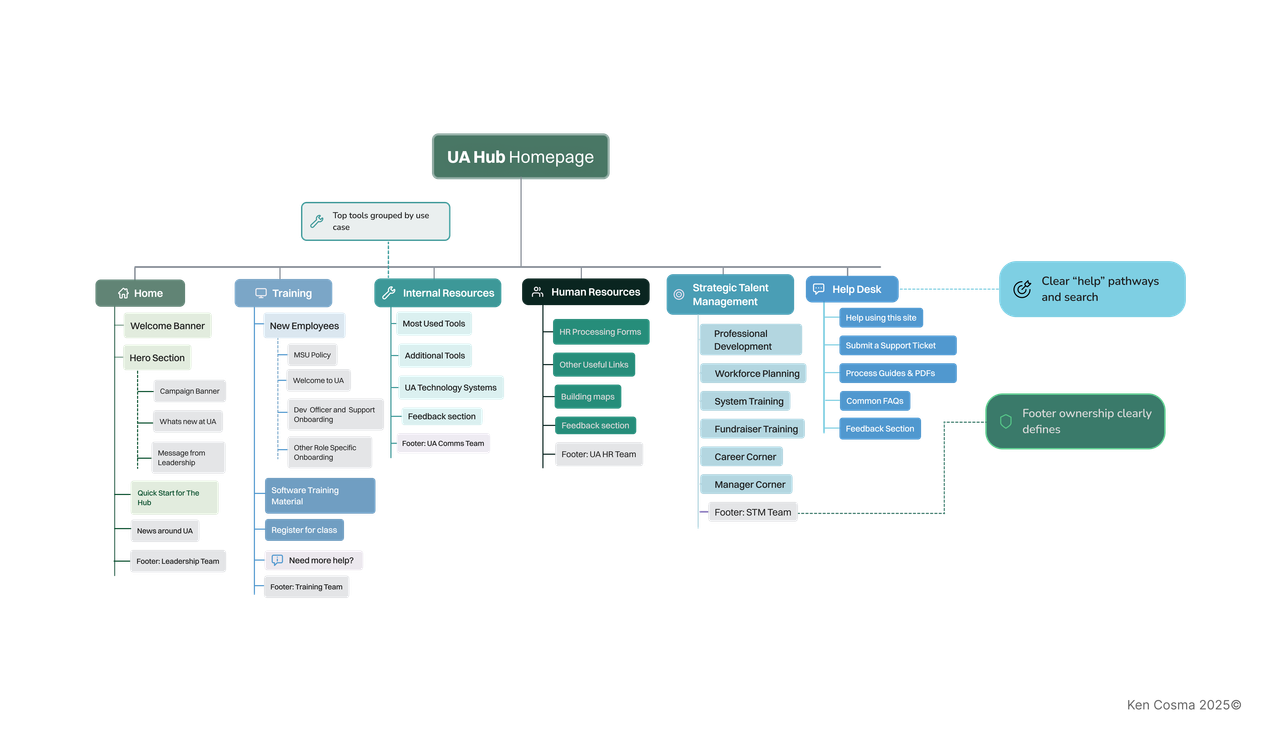
The redesigned IA restructures navigation around user intent — with named ownership in every section footer and a Quick Start on each page for new employees
What It Delivered
The project did not reach full production deployment within the internship timeline. Outcomes are measured against validated friction points and directional signals.
Stakeholders across HR, IT, and Communications reached shared agreement on the purpose of the Hub versus Teams. For an organization where that boundary had never been formally defined, alignment itself was a significant deliverable.
IT stakeholder Andrew DeGarmo confirmed alignment on the department ownership model. He identified content maintenance as the platform's core bottleneck. The proposed model addressed it directly.
Proposed IA changes mapped directly to the top complaint categories from every interview: navigation label confusion, content duplication, and staff directory usability.
Time-to-task for core workflows, usage of redesigned entry points, HR and IT request volume related to content discovery, and content freshness rates by section.
Three Decisions Before Any Visual Redesign
Three organizational decisions need to happen before any visual redesign will hold.
What Enterprise UX Taught Me
Enterprise UX taught me that the interface is rarely where the hardest problems live. The real challenges on this project were organizational — getting seven stakeholders with competing priorities to agree on what the platform was supposed to do, making design decisions that could survive SharePoint's constraints, and building a governance model that non-designers could actually maintain after I left.
Framing design decisions in business terms was necessary. Stakeholders didn't respond to UX rationale alone. They responded to operational cost, onboarding efficiency, and reduced support burden. Learning to speak that language — and to design systems that outlast the designer — shaped how I think about every enterprise problem since.